Prototyping in Pieces: Where design and code come together to form a cus-
tomizable jigsaw puzzle game.
I will be working solo for the final project. I’m in Lab 4 - Debug.
Group Name: The Missing Piece.
My plan with this project is to build an interactive jigsaw puzzle game on
p5.js that transforms images into a customizable jigsaw-style game. The concept
is to give users both creativity and control: they can choose to either upload their
own custom image or choose from a dedicated set of preloaded images, select the
number of puzzle pieces, and then solve it by dragging and placing pieces into
their correct positions. By combining customization with adjustable difficulty
by selecting the number of pieces, the game offers an engaging experience with
both intuitive design and personalization.
My main motivation behind this project comes from my hobby of jigsaw
puzzles during my downtime. Whenever taking breaks from schoolwork, I like
to relax with a jigsaw puzzle while watching TV or listening to music. I figured
this would be a perfect aspect to create my final project around, something that
would be challenging and fun to complete.
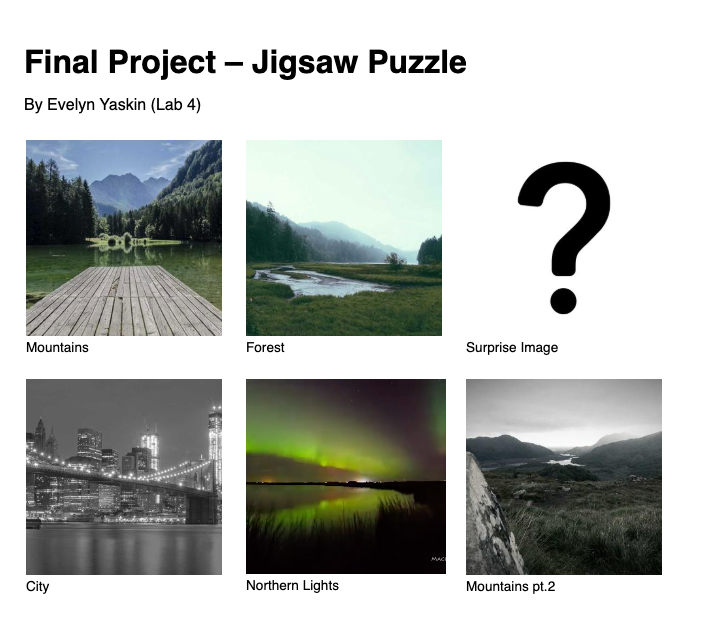
When the application first launches, the user is presented with a simple
but intuitive interface. They are shown a screen with multiple examples of
pre-loaded puzzle images that the user can choose from to complete. The built-
in gallery gives the user a simple start option, where they can immediately
start playing without needing to upload their own file, while the upload option
still allows for a more personalized experience. Once an image is selected, the
user chooses their difficulty by specifying how many pieces the image should
be divided into. If time permits, the user will also be able to choose whether
they want pieces to be able to rotate or not, to further increase difficulty. This
feature is implemented as a grid system, such as 3x3 for easier levels, or up to
10x10 (or higher) for a more advanced option.
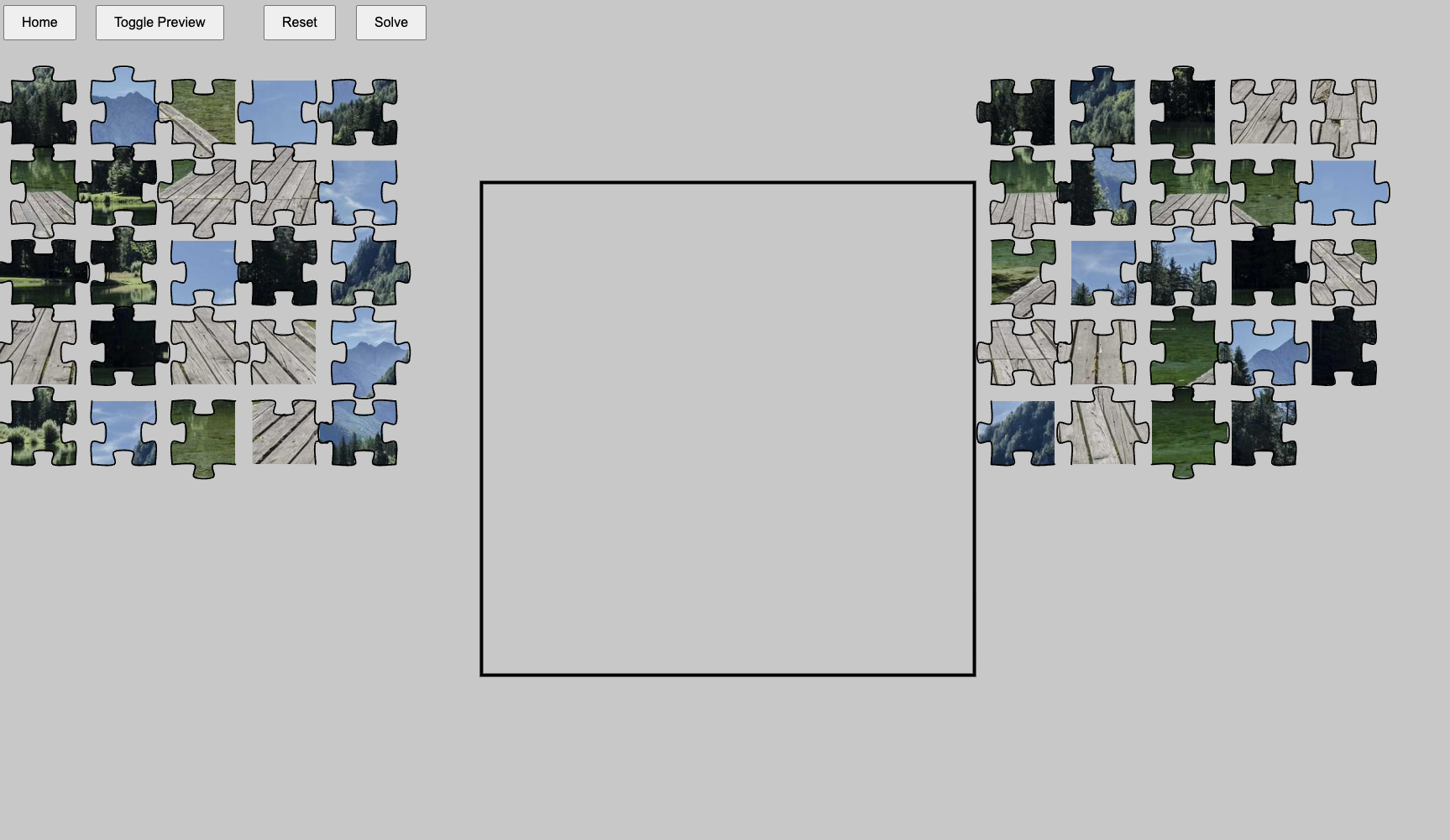
After the image and difficulty are selected, the program processes the image
by dividing it into equally sized segments. Each segment of the picture will be-
1
come an individual puzzle piece that stores memory about its correct position.
The pieces are then shuffled randomly across the canvas. The player interacts
with a puzzle through a drag-and-drop system, where there’s a bar on the bot-
tom of the canvas, displaying all the pieces for the user to drag onto the canvas,
and then reposition them in the position they think they belong. The bar on
the bottom of the canvas allows for a cleaner experience, where the user can
drag pieces on the screen and put them back when not in use. If time permits,
I will also further implement an option for the first pieces shown, which will be
just the border pieces. That way, if the user chooses to make the difficulty a
little easier, they can start with just the border pieces shown in the bar that
they can then drag onto the screen. When a piece is moved close to its cor-
rect location, it snaps into place, providing immediate visual feedback (perhaps
even auditory feedback), making the experience more satisfying and intuitive.
To enhance gameplay, the application may include features such as a timer and
a move counter, allowing users to track their performance and challenge them-
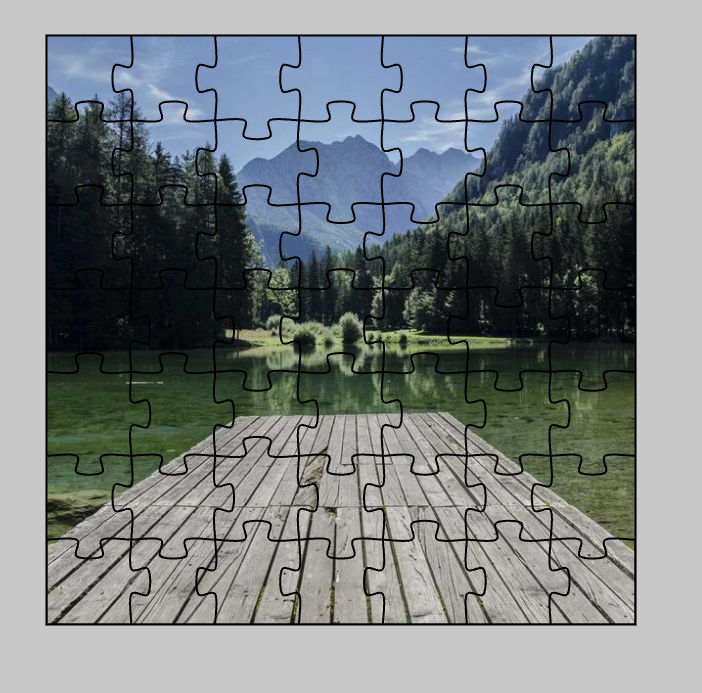
selves. Additional tools, such as a toggle hint system or a faint background
overlay of the image, can help guide users if they get stuck. Over the course
of development, the project can be expanded with further features, including a
scoring system, where the user can view their high score (calculated by difficulty
and time completed) to encourage replayability and competition.
Overall, my puzzle game will be more than just a simple application; it will
be a dynamic and interactive system that blends creativity, logic, and user-
driven content. By giving users the option to upload their own images or
to select from existing ones, and by offering adjustable difficulty, the project
creates a unique and replayable experience each time it is used.
tomizable jigsaw puzzle game.
I will be working solo for the final project. I’m in Lab 4 - Debug.
Group Name: The Missing Piece.
My plan with this project is to build an interactive jigsaw puzzle game on
p5.js that transforms images into a customizable jigsaw-style game. The concept
is to give users both creativity and control: they can choose to either upload their
own custom image or choose from a dedicated set of preloaded images, select the
number of puzzle pieces, and then solve it by dragging and placing pieces into
their correct positions. By combining customization with adjustable difficulty
by selecting the number of pieces, the game offers an engaging experience with
both intuitive design and personalization.
My main motivation behind this project comes from my hobby of jigsaw
puzzles during my downtime. Whenever taking breaks from schoolwork, I like
to relax with a jigsaw puzzle while watching TV or listening to music. I figured
this would be a perfect aspect to create my final project around, something that
would be challenging and fun to complete.
When the application first launches, the user is presented with a simple
but intuitive interface. They are shown a screen with multiple examples of
pre-loaded puzzle images that the user can choose from to complete. The built-
in gallery gives the user a simple start option, where they can immediately
start playing without needing to upload their own file, while the upload option
still allows for a more personalized experience. Once an image is selected, the
user chooses their difficulty by specifying how many pieces the image should
be divided into. If time permits, the user will also be able to choose whether
they want pieces to be able to rotate or not, to further increase difficulty. This
feature is implemented as a grid system, such as 3x3 for easier levels, or up to
10x10 (or higher) for a more advanced option.
After the image and difficulty are selected, the program processes the image
by dividing it into equally sized segments. Each segment of the picture will be-
1
come an individual puzzle piece that stores memory about its correct position.
The pieces are then shuffled randomly across the canvas. The player interacts
with a puzzle through a drag-and-drop system, where there’s a bar on the bot-
tom of the canvas, displaying all the pieces for the user to drag onto the canvas,
and then reposition them in the position they think they belong. The bar on
the bottom of the canvas allows for a cleaner experience, where the user can
drag pieces on the screen and put them back when not in use. If time permits,
I will also further implement an option for the first pieces shown, which will be
just the border pieces. That way, if the user chooses to make the difficulty a
little easier, they can start with just the border pieces shown in the bar that
they can then drag onto the screen. When a piece is moved close to its cor-
rect location, it snaps into place, providing immediate visual feedback (perhaps
even auditory feedback), making the experience more satisfying and intuitive.
To enhance gameplay, the application may include features such as a timer and
a move counter, allowing users to track their performance and challenge them-
selves. Additional tools, such as a toggle hint system or a faint background
overlay of the image, can help guide users if they get stuck. Over the course
of development, the project can be expanded with further features, including a
scoring system, where the user can view their high score (calculated by difficulty
and time completed) to encourage replayability and competition.
Overall, my puzzle game will be more than just a simple application; it will
be a dynamic and interactive system that blends creativity, logic, and user-
driven content. By giving users the option to upload their own images or
to select from existing ones, and by offering adjustable difficulty, the project
creates a unique and replayable experience each time it is used.